
Cinematic Canvas Update
Crossing The Generative Workflow Frontier
The traditional video editing workflow is reactive. A creator begins with fixed clips, cutting time to establish space. In contrast, generative video turns this logic upside down — it’s proactive. The creator is actively creating the clips in real-time. The central workflow question becomes:
How do you command a fluid generative canvas rather than simply react to its unpredictable output?
The answer separates creators who treat generative AI as unpredictable tools from those who use them as a scalable workspace.
Cinematic Canvas introduces a hybrid workflow, plucking the best features of reactive editing tools like Adobe Premiere or After Effects, and augmenting them for generative AI proactivity. The result is an efficient, transparent video editor that allows creators to keep an intentional creative direction while maximizing creative speed and the utility of generative AI.
What is Cinematic Canvas?
Cinematic Canvas is a generative film-making tool that treats storytelling elements as structured primitives — enforcing character persistence and narrative progression across multi-scene workflows.
Technology Stack: React · Node.js · PostgreSQL · Google Cloud Platform · Vertex AI
What’s New: Deep-Engine Enhancements
Last sprint established resilient pipeline error handling with AI safety and quality interventions. With human-in-the-loop controls now active, this cycle focused on three foundational upgrades: a node-based UI overhaul, decentralized state management, and memory-safe asset handling.
Together, these changes eliminate UI bottlenecks and give creators explicit, auditable control over asset quality, project structure, and narrative outcomes.
1. Node-Based Canvas UI Refinements
The UI has transitioned to a node-based spatial workflow modeled after a professional artist’s workspace. Creator control flows through gesture-based interactions across a live, connected project graph — giving creators the spatial freedom to build and observe their project holistically rather than in timelines.
- Interaction Model: Canvas nodes expose input/output ports that accept typed project assets. Gesture-based scene-linking, asset generation, and scene editing are all available directly from the canvas surface.
- Metadata Management: The
MetadataNodeInspectorfeatures dedicated project metadata. Global changes can be made from a single component. - Asset Persistence: The UI applies 1-second debouncing, delivering robust undo/redo state persistence without blocking the UI during rapid edits.
The Result: A gesture-controlled workspace enhances creative expression while preserving full, intuitive control over complex multi-scene projects.
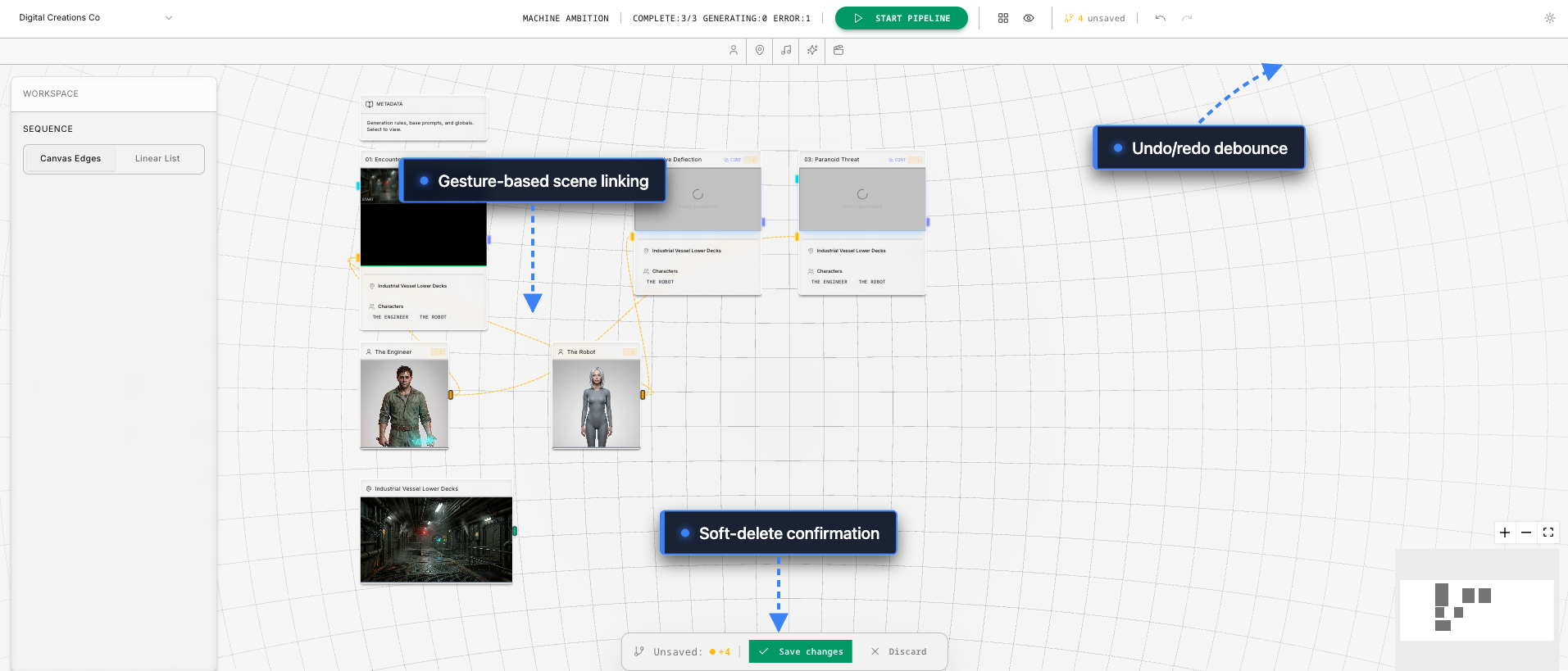 The canvas UI enables creator experimentation with gesture-based scene linking and robust undo/redo persistence.
2. Decentralized Store Architecture
Client-side state management has been refactored from a monolithic tree into specialized domain stores. Projects, assets, canvas layout, and pipeline state each operate independently — eliminating the coordination bottlenecks that degraded UI responsiveness during complex editing sessions.
- Syncing: Stores communicate via event propagation, supporting parallel state updates without coordination overhead.
- Performance: Node-level debouncing and memoized selectors enable targeted, efficient state updates that don’t trigger unnecessary re-renders.
- Concurrency-First Design: The end-to-end architecture is built for parallel execution, extending the dependency-aware batch processing delivered last sprint.
- Information-Rich Feedback: Pending canvas changes are surfaced to the creator before they are committed — providing clear visibility into the downstream consequences of each UI gesture before assets are generated or modified.
The Result: A highly responsive UI delivers real-time creative feedback, eliminating lag during resource-heavy editing sessions. The application is faster, more reliable, and easier to debug, directly translating to a smoother editing experience.
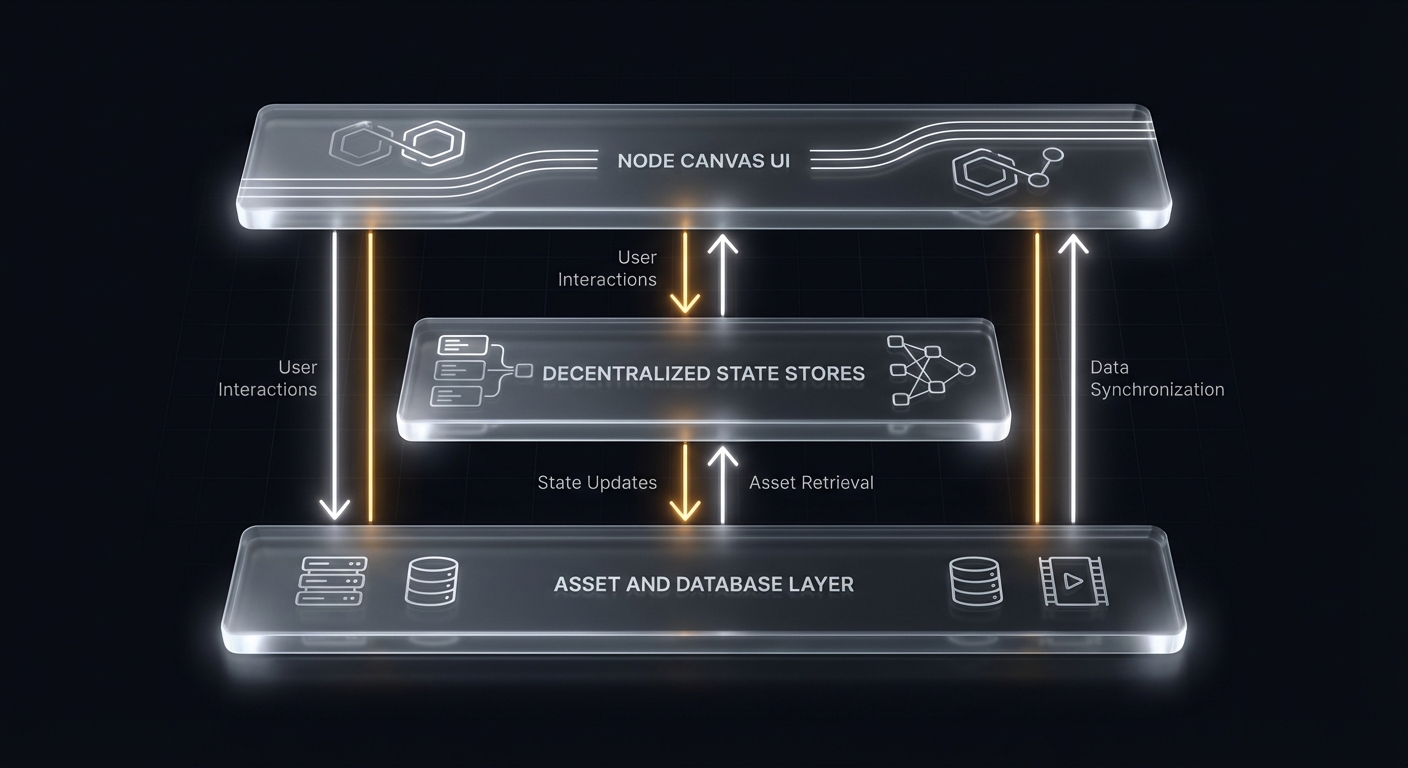 Cinematic Canvas’s canvas-based UI and service layers enable high-velocity creative control and professional-grade production.
3. Memory-Safe Asset Management
Media reference counting now tracks every asset across the full project — character images, backgrounds, and scene outputs — maintaining an accurate, real-time item ledger in the database.
- Async Cleanup: When assets are replaced or deleted, orphaned files are automatically queued for asynchronous garbage collection.
- Non-Blocking: Cleanup runs entirely in the background, keeping the client fully responsive even during large-scale project overhauls.
Direct Benefit: Creators iterate rapidly without performance degradation or manual file management. Storage optimization runs silently, invisibly, and automatically.
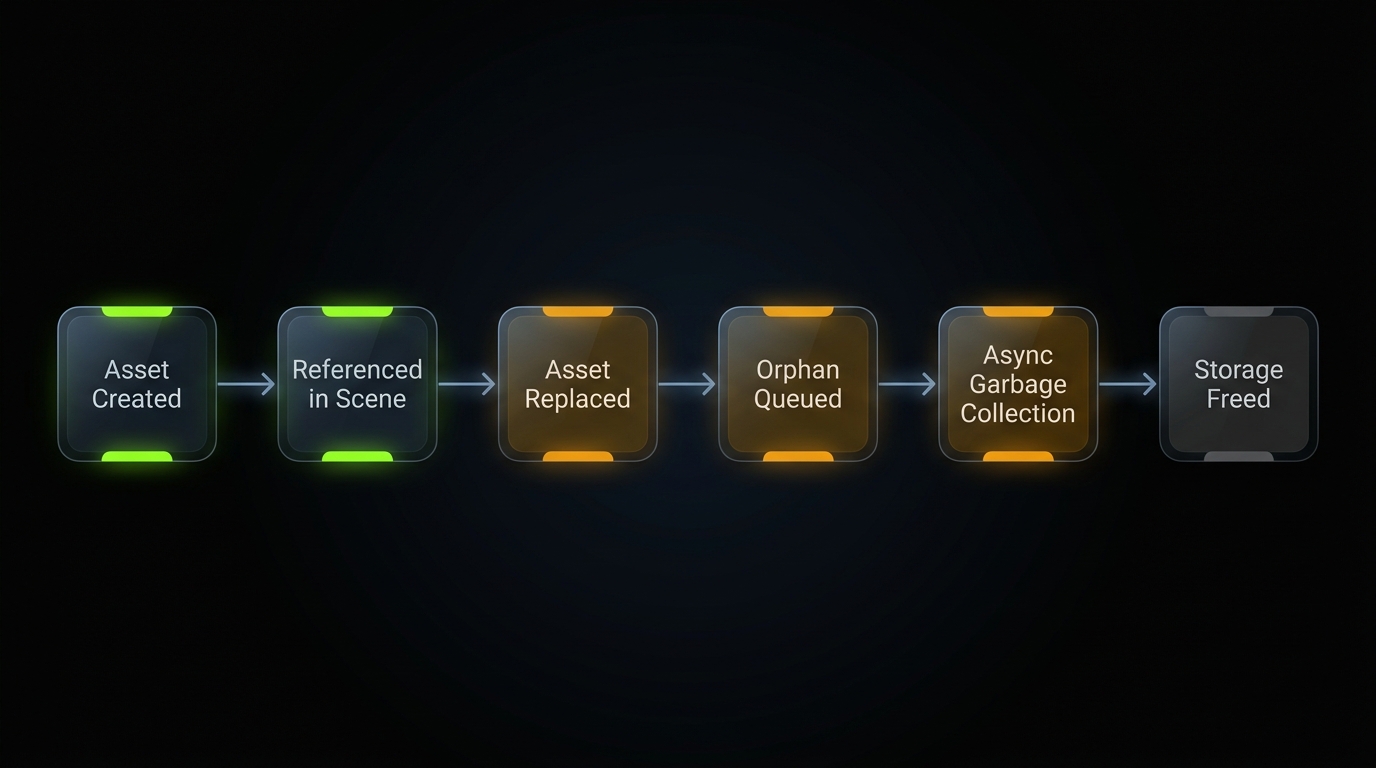 Media reference counting tracks assets system-wide, enabling asynchronous, automatic garbage collection for orphaned files.
What’s Shipping Next
The next sprint will focus on expanding the workspace toolset and hardening canvas infrastructure to provide users with greater creative control.
- Experimental Tool Integration: Expanding creator-facing workspace features.
- Canvas Reliability & UX: Optimizing UI feedback and hardening asset persistence for high-concurrency environments.
- Granular Asset Control: Enabling diverse input types across the project timeline to improve output accuracy.
Workflow structure is ultimately shaped by the scale and maturity of the story being told. Beginners thrive in beautifully chaotic iterative loops, assembling cool shots into a narrative vibe. Advanced creators demand the opposite: characters, locations, and beats defined before a single expensive frame is generated. Human-in-the-loop gates catch visual flaws early and prevent costly mistakes from cascading through production.
High-velocity experimentation — rapidly finding a vibe that sticks and refining it — is itself a form of creative intent. Cinematic Canvas enables both approaches, enabling creators to break old rules of production and leverage novel tools to direct their vision. Whether vibe-coding or enforcing structured lore, the most effective workflow is the one that delivers enough control to execute your vision with quality.
As we continue to build Cinematic Canvas, our mission remains the same: empowering creators with structured, generative tools. We are not just making video; we are building new tools for digital storytelling.
🔗 Read the full changelog: github.com/digitalcreationsco/cinematic-canvas/blob/main/CHANGELOG.md
Thank you for building with us. Steady progress and a great week ahead!
#GenerativeAI #GenerativeVideo #DistributedSystems #BuildInPublic #SystemDesign