
The Narrative-Aware Workspace
The Narrative-Aware Workspace
Last week’s Cinematic Canvas update introduced dual-tier layout persistence and intelligent entity mentions, stabilizing the canvas workspace as the foundation for more complex storyboards and collaborative projects.
This week, the focus shifted from persistence to content arrangement tools. The workspace is a visual editing and authoring environment. Creators don’t just arrange scenes; they write them, populate them with custom characters and locations, and trust the workspace agent to weave it all together into a cohesive narrative.
Simultaneously, the canvas must handle ambitious projects featuring hundreds of assets and nodes with interaction patterns that never conflict.
The result is a workspace that feels less like software and more like a physical studio—equipped with an immersive scene editor, structured AI-assisted entity creation, and tools optimized for scaling creative narratives.
The canvas workspace continues to evolve as a creative authoring environment.
What is Cinematic Canvas?
Cinematic Canvas is the generative AI workspace for storytelling. It treats story elements—characters, locations, scenes, and style references—as structured primitives, giving creators total control over building cinematic worlds with strict visual and narrative continuity.
Technology Stack: React (Vite) · Zustand · Tailwind CSS · @xyflow/react · Node.js · LangGraph · PostgreSQL · IndexedDB
What’s New
1. Structured Entity Creation
The workflow for creating and importing characters and scenes has been completely overhauled. New features include validated entity forms, AI-assisted entity completion, drag-and-drop media uploads, and a pipeline designed to complement the assets you have already built.
- Validated Forms: Every entity insert passes through strict validation schemas that enforce required fields (name, description, physical traits for characters, atmosphere for locations, scene indices) and reject malformed data before it reaches the database. Comprehensive test coverage ensures edge cases are caught early.
- AI-Assisted Completion: Enables full contextual entity creation from user inputs. Characters, locations, and scenes are intelligently populated from a name, a description, or a reference image.
- Drag-and-Drop Uploads: New entities accept file drops directly into the form. Images are deduplicated at upload time to prevent redundant storage writes, and scene frame thumbnails are auto-generated.
- Entity-Aware Pipeline: The storyboard generation pipeline now detects entities created prior to execution. The workspace agent “sees” your existing entities and selectively generates new ones to complement the narrative.
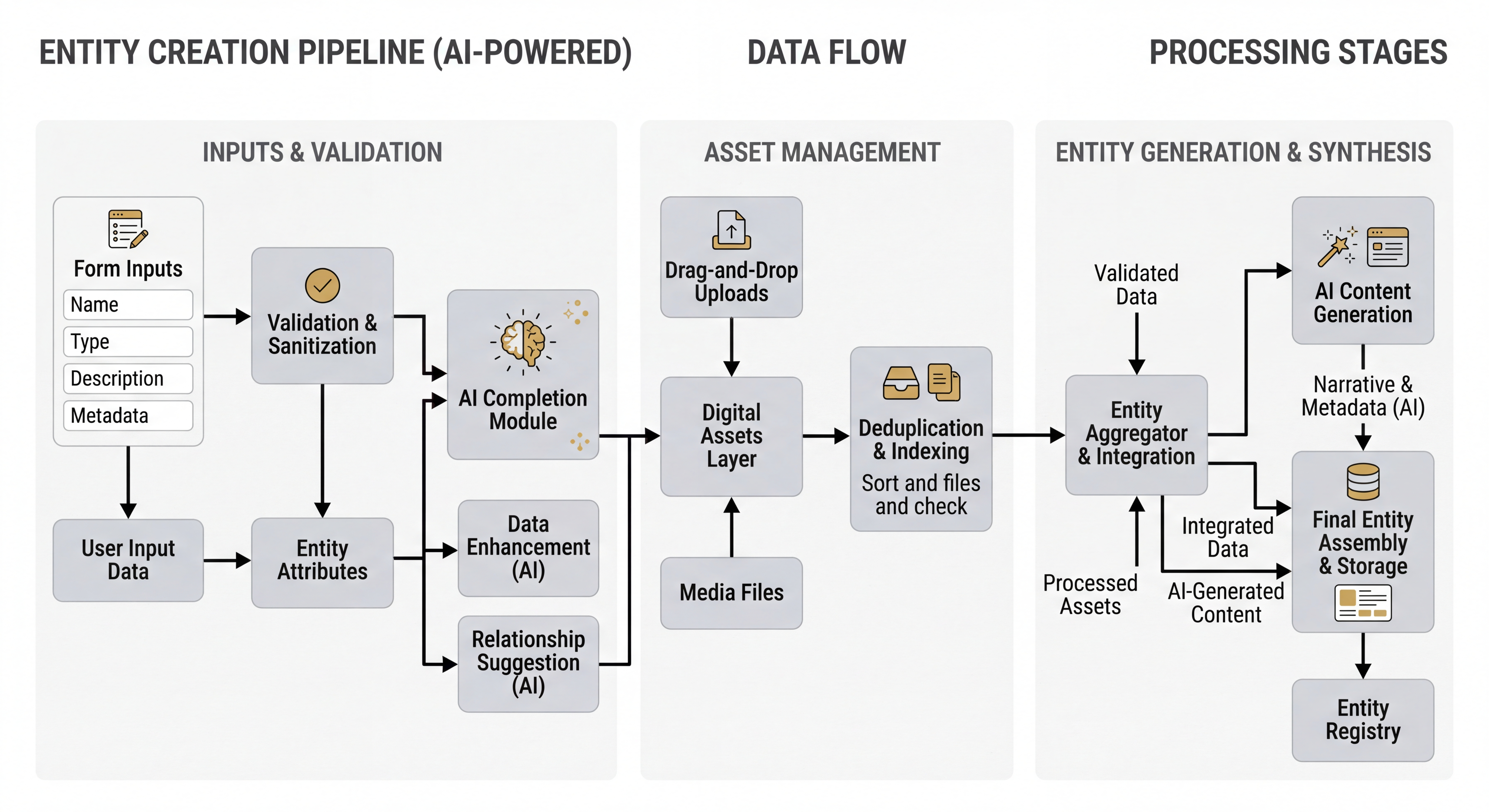 Entity forms validate via input data, deduplicate at the asset layer, and merge with AI-generated entities during storyboard generation.
The Result: The workspace enables world-building at any stage of the pipeline. You can utilize an incremental workflow, and the pipeline will honor every custom asset you’ve created, weaving them into the storyboard with full continuity.
2. Canvas Performance & Interaction Hardening
The canvas received its deepest UX pass yet, focusing on performance optimization for massive projects, permanent entity deletion, and systematic fixes for event propagation conflicts.
- 1000-Node Performance:
React.memo,useCallback, anduseShallowselectors have been applied across all canvas components with explicitPERF-MEMO,PERF-CALLBACK, andPERF-SELECTORmarkers. The node graph now handles thousands of images and hundreds of video-bearing nodes without frame drops. - Permanent Deletion: Entity nodes can now be permanently deleted from projects. The
DeleteNodeConfirmationDialogremains mounted during async operations, preventing the UI from closing before the database round-trip completes. - Context Menu Hardening: Several fixes resolved event propagation conflicts between the context menu, modals, and Radix UI dropdowns. Solutions include a new
EventStopperwrapper component, capture-phase click-outside detection, auseUIMenuStorefor mutual menu exclusivity, and ref-patternonClosehandlers to prevent stale closures. - Global Notifications: The bespoke toast notification implementation has been replaced with unified
GlobalNotifications. System messages and agent messages are now consolidated into a single user-facing message stream.
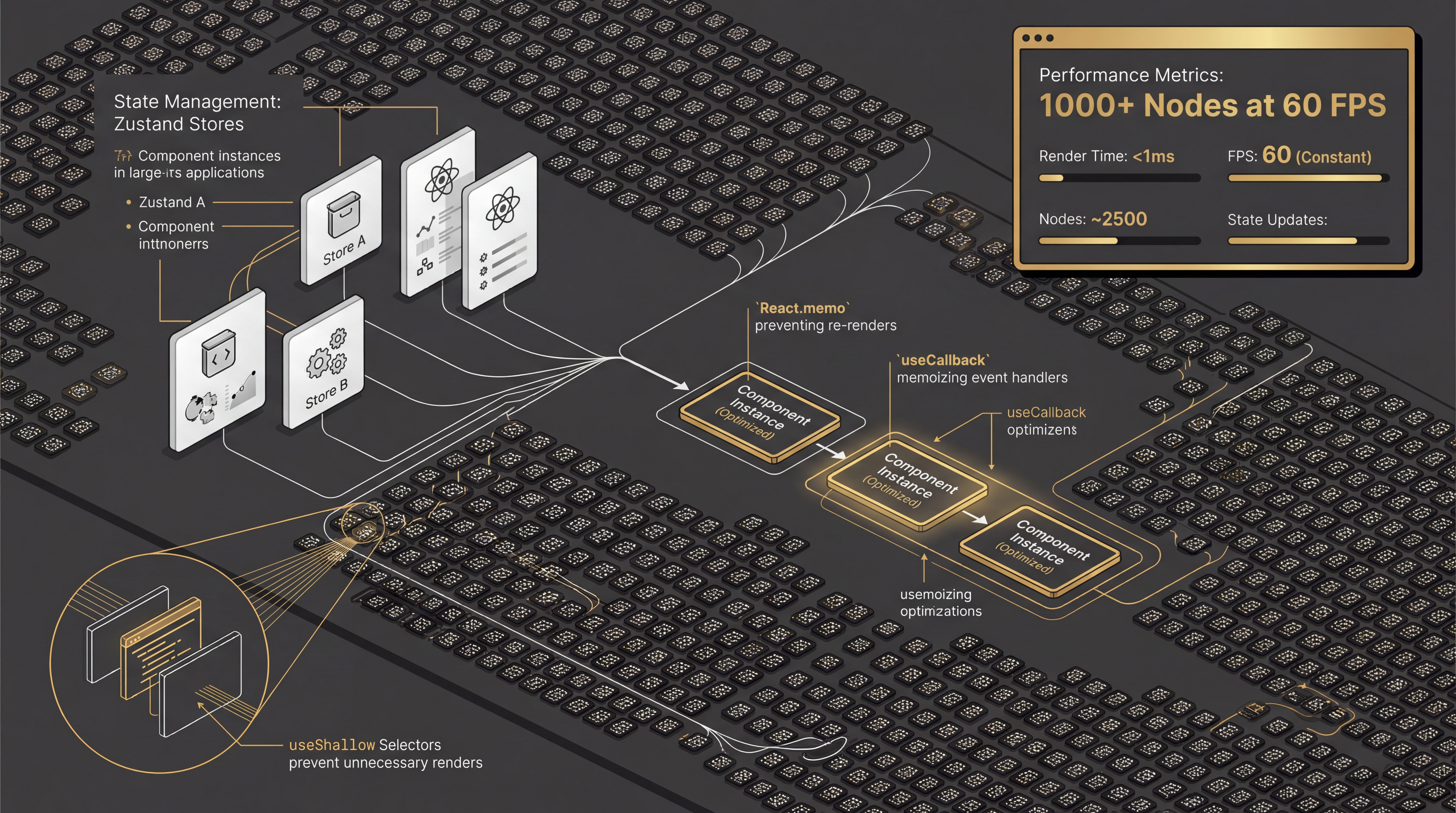 Floating panels, memoized node rendering, and unified state management deliver smooth performance at narrative scale.
The Result: The canvas effortlessly handles ambitious projects with stable framerates, reliable context menus, and destructive actions that execute exactly as expected.
The tools of creators should be as ambitious as the stories they tell. Every update to Cinematic Canvas exists to enable greater storytelling by keeping the creator’s focus exactly where it belongs: on the narrative.
This week’s updates deliver a professional authoring environment. Creators can write scenes, build characters, import reference imagery onto the canvas, and trust the workspace agent to weave it all together. The underlying infrastructure has been hardened to handle the massive scale that professional-grade storytelling demands.
What’s Shipping Next
- Versioning System 2.0: Enabling version-controlled branching so creators can explore narrative forks without risk.
- Immersive Scene Editor: A dedicated surface for refining individual scenes directly within the canvas workspace.
Read the full changelog: github.com/digitalcreationsco/cinematic-canvas/blob/main/CHANGELOG.md
Thank you for building with us. Steady progress and a great week ahead!
#GenerativeAI #GenerativeVideo #SceneEditor #WorldBuilding #CreativeTools #StructuredContext