World-Building Tools For Creators Pt.1
World-Building Tools For Creators Pt.1
Last week, we focused on centralizing the API and establishing a decentralized asset store architecture, empowering the node-based canvas UI with improved state management and polymorphic media tracking.
As the canvas expanded to handle larger storyboards, two new challenges emerged: preventing cross-session layout drift during real-time collaboration, and creating a cohesive way to reference world entities within scenes without heavy dropdowns.
This week, we doubled down on the robustness of the spatial workspace by implementing dual-tier layout persistence and a seamless mention system. Cinematic Canvas introduces a new hybrid storage mechanism for frictionless workspace storage, and tag-based Mentions System which enables a relational, context-aware world-building experience.
What is Cinematic Canvas?
Cinematic Canvas is the generative AI workspace for storytelling. The AI-assisted workspace treats story elements as structured primitives, giving you total control over cinematic worlds with character and narrative continuity.
Technology Stack: React · Node.js · PostgreSQL · Google Cloud Platform · Vertex AI
What’s New: Low-latency Canvas Persistence & Context-Aware Tagging
1. Dual-Tier Layout Persistence
The engine now handles workspace layout persistence through a new HybridNodeStorage system, marrying the speed of local storage with the reliability of the cloud. It combines debounced local IndexedDB writes with serialized Postgres database synchronization.
- Syncing: The dual-tier system ensures in-order writes to the cloud while instantly saving to local storage with zero UI lag.
- Performance: Render cycles have been drastically reduced by fixing infinite loop conditions within scene nodes and resolving race conditions during entity spawning.
- Reliability: Even if the cloud connection drops, your node positions are safeguarded locally and synchronized automatically when you reconnect.
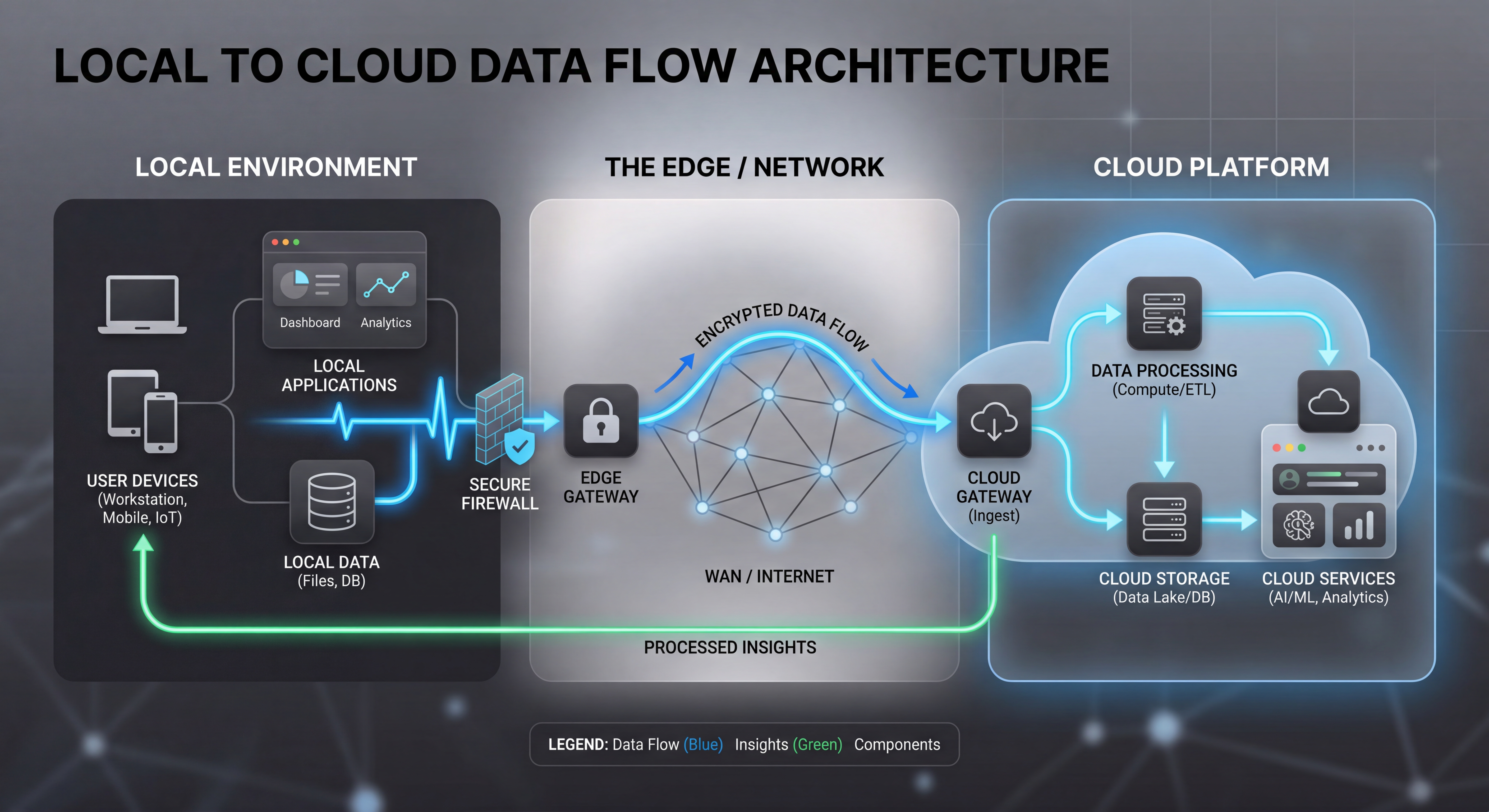 Data flows instantly to client IndexedDB and synchronized with Postgres using real-time changestream.
The Result: You can pan, zoom, and organize massive storyboards without fear of data loss, even during network blips or when collaborating across multiple devices.
2. Intelligent Entity Mentions
Writing scenes often requires referencing characters and locations. We built a comprehensive Entity Mentions System to replace clunky forms and manual linking.
- Tag Registry Service: A backend service that manages globally unique @handle identifiers across the project and world scope, guarded by strict Role-Based Access Control (RBAC).
- Knowledge Base Hydration: A backend hydrator that intercepts mentions, validates trace IDs, and retrieves structured entity metadata before LLM generation.
- MentionInput Component: Powered by Tiptap, the editor caches suggestions client-side for zero-latency typing, dynamically inserting visual spans when a valid entity is tagged in the scene description.
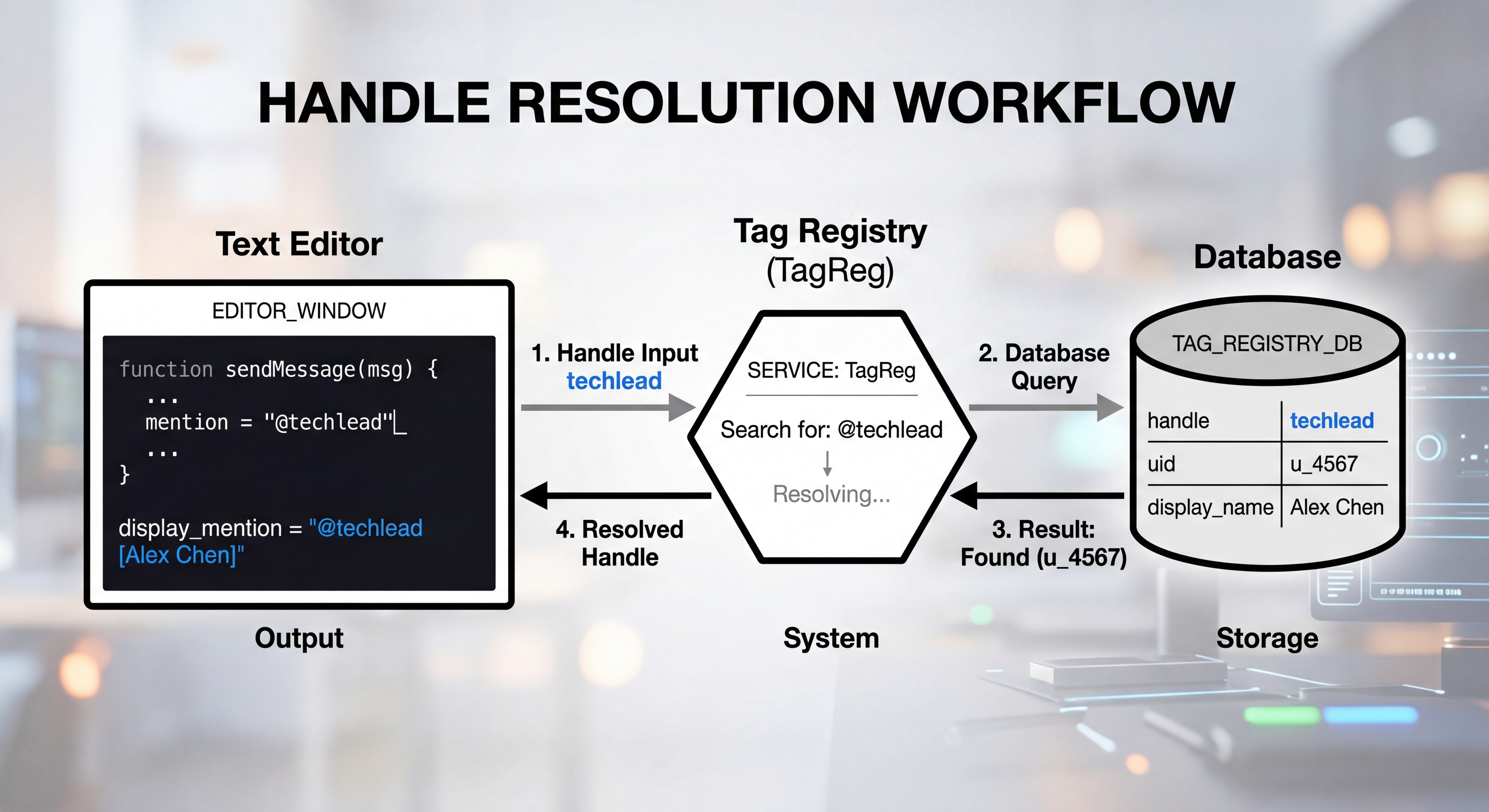 The MentionInput component resolves @handles against a cached TagRegistry, hydrating context before LLM generation.
The MentionInput resolves @handles against a cached TagRegistry, hydrating context before LLM generation.
The Result: You can seamlessly weave characters and locations directly into your scene descriptions with a few keystrokes, knowing the engine will perfectly maintain their visual continuity.
3. Drag-and-Drop Interactive Media Canvas
A modern workspace should feel tactile. New canvas enhancements include direct media manipulation.
- Collaborative Storyboarding: File imports enable a media-rich storyboard generation experience, where the workspace agent produces complementary media assets to enhance the narrative.
- File Ingestion: Implemented a unified drop zone. Dropping images instantly creates Location or Character nodes, while dropping audio tracks triggers the new AudioPlayer component.
- Audio File Nodes: Audio files are now represented as interactive nodes on the canvas, allowing you to position and manage them alongside your scenes.
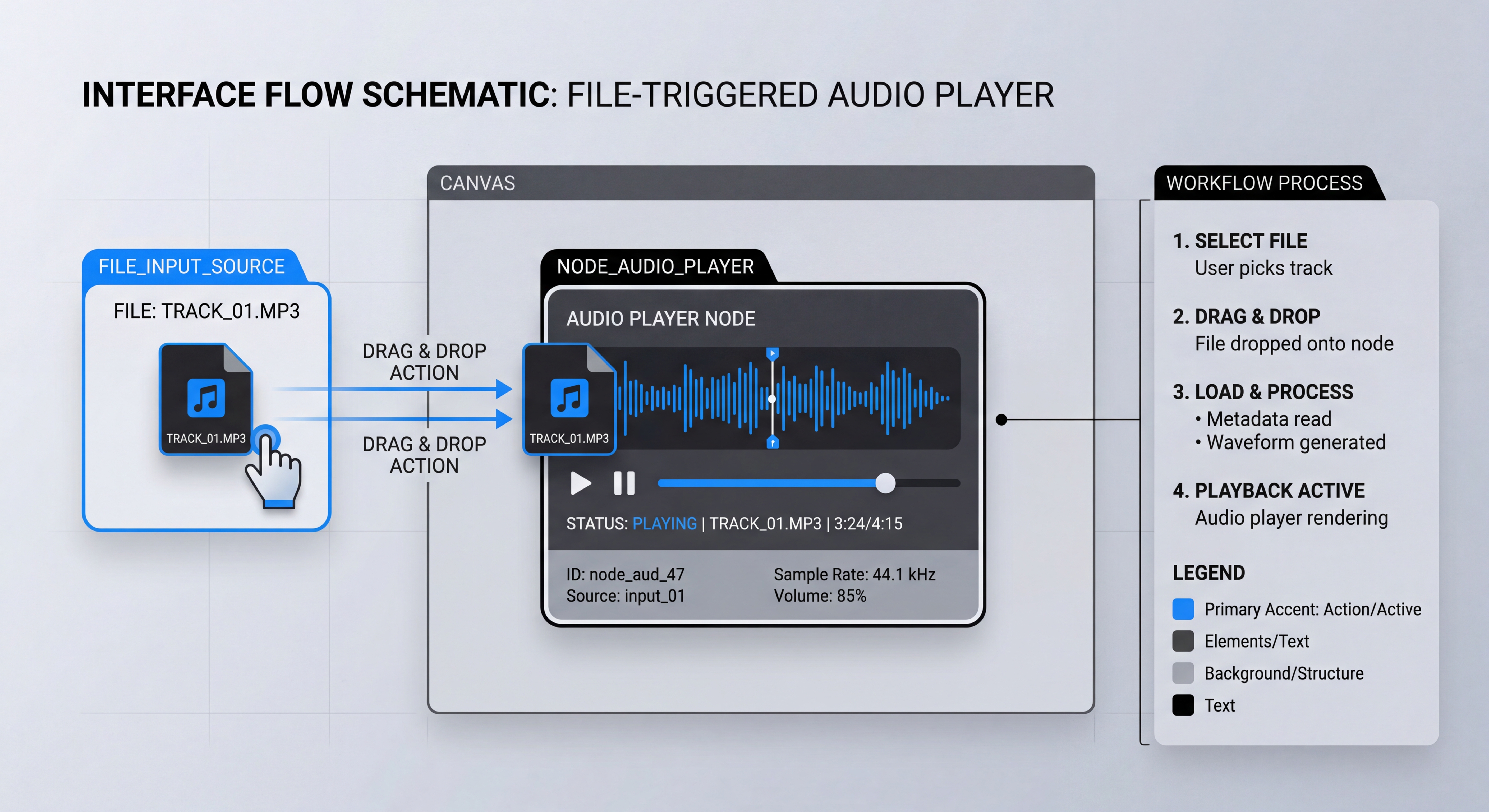 Audio and image file drops instantiate new interactive nodes directly within the canvas.
The Result: Import reference material, audio, and more into your worlds, by simply dragging them onto the canvas, keeping you immersed in the creative flow.
What’s Shipping Next
- Experimental Tool Integration: Expanding creator-facing workspace features.
- Generative Composite Nodes: Merging multiple canvas inputs via prompt engineering to create intricate, multi-layered shots.
- Enhanced Timeline View: Translating canvas layouts into a sequential video timeline for final review.
The act of world-building is fundamentally an act of connection—stitching characters to locations, soundscapes to moments, and lore to visual reality. Unstructured generative video treats each of these moments as an isolated gamble. By contrast, a spatial, node-based workspace transforms those gambles into an interconnected, reliable universe.
When the tools of creation are slow, stateful, or brittle, the creative flow breaks. That’s why pushing state resolution to the edge with a local-first architecture isn’t just a technical optimization—it’s a creative requirement. By shielding the filmmaker from network latency and database conflicts through optimistic UI and hybrid storage, we ensure that their focus remains entirely on the narrative, not on whether the system successfully saved their latest structural change.
As we continue to build Cinematic Canvas, our mission remains the same: empowering creators with structured, generative tools. We are not just making video; we are building resilient tools for digital storytelling.
Read the full changelog: github.com/digitalcreationsco/cinematic-canvas/blob/main/CHANGELOG.md
Thank you for building with us. Steady progress and a great week ahead!
#GenerativeAI #GenerativeVideo #LocalFirst #ReactFlow #WorldBuilding #DistributedSystems #SystemDesign