🎬 The Workspace Becomes the Writer's Room
The Workspace Becomes the Writer’s Room
Last week, Cinematic Canvas introduced dual-tier layout persistence and intelligent entity mentions, stabilizing the spatial workspace as the foundation for larger, more complex storyboards.
This week, the focus shifted from where things go to what they say. The workspace needed to become an authoring environment — a place where creators don’t just arrange scenes, but write them, populate them with validated characters and locations, and trust the pipeline to weave it all together without losing a single asset. At the same time, the canvas had to handle ambitious projects: hundreds of nodes, resizable floating panels, and interaction patterns that never fight each other.
The result is a workspace that feels less like a graph editor and more like a writer’s room — equipped with an immersive scene editor, structured entity creation, and a canvas optimized for narrative scale.
 The workspace evolves: from spatial layout to creative authoring environment.
What is Cinematic Canvas?
Cinematic Canvas is the generative AI workspace for storytelling. It treats story elements — characters, locations, scenes, and style references — as structured primitives on a spatial canvas, giving creators total control over cinematic worlds with visual and narrative continuity.
Technology Stack: React (Vite) · Zustand · Tailwind CSS · @xyflow/react · Node.js · LangGraph · PostgreSQL · IndexedDB
1. Immersive Scene Editor
The canvas now includes a full-screen Scene Editor — a dedicated authoring surface for writing and refining individual scenes without leaving the spatial workspace. Right-click any scene node and select Open in Editor, or use the toolbar button in the Scene Detail Panel.
- Workspace-Inspired Layout: The editor uses a three-column architecture: a scene navigator sidebar on the left, a cinematic frame preview with a dual-track Visual/Audio timeline in the center, and an AI co-writer panel on the right. The design language borrows from professional NLE editing suites while remaining native to the canvas.
- Editable Fields: Scene name, description/prompt, mood, and continuity notes are all inline-editable. Continuity notes are parsed as newline-delimited entries for structured multi-note tracking.
- Persistence: Every save round-trips through the
patchEntitiesAPI and writes directly to PostgreSQL, keeping the canvas graph and the editor in lockstep. - Motion Design: Entry/exit animations use spring-based easing (
[0.16, 1, 0.3, 1]) with a staggered delay, giving the editor a cinematic open/close feel.
 The Scene Editor’s three-column layout: scene navigator, cinematic preview with Visual/Audio timeline, and AI co-writer.
Direct Benefit: You can now write, rewrite, and refine scene dialogue, mood, and continuity notes in an immersive full-screen environment — without losing context of where the scene lives in your larger storyboard.
2. Structured Entity Creation & Pipeline Integration
Creating characters, locations, and scenes has been completely rebuilt with validated entity forms, drag-and-drop media uploads, and — critically — a pipeline that respects entities you’ve already created.
- Zod-Validated Forms: Every entity insert passes through strict Zod schemas that enforce required fields (name, description, physical traits for characters, atmosphere for locations, scene indices) and reject malformed data before it reaches the database. Comprehensive test coverage ensures form validation edge cases are handled.
- Drag-and-Drop Uploads: The
NewEntityModalnow accepts file drops directly into the form. Images are deduplicated at upload time to prevent redundant storage writes, and scene frame thumbnails are auto-generated. - Pre-Created Entity Pipeline: The storyboard generation pipeline now detects entities that were created before pipeline execution. The worker deduplicates by
referenceId, merges user-provided entities with AI-generated ones, and ensures user-uploaded images are properly associated — preventing the frustrating “duplicate character” problem. - Asset Grid Layout: The
TopAssetPanelhas been converted from a flat list to a wrapping grid, making drag-and-drop of characters and locations onto the canvas significantly more spatial and intuitive.
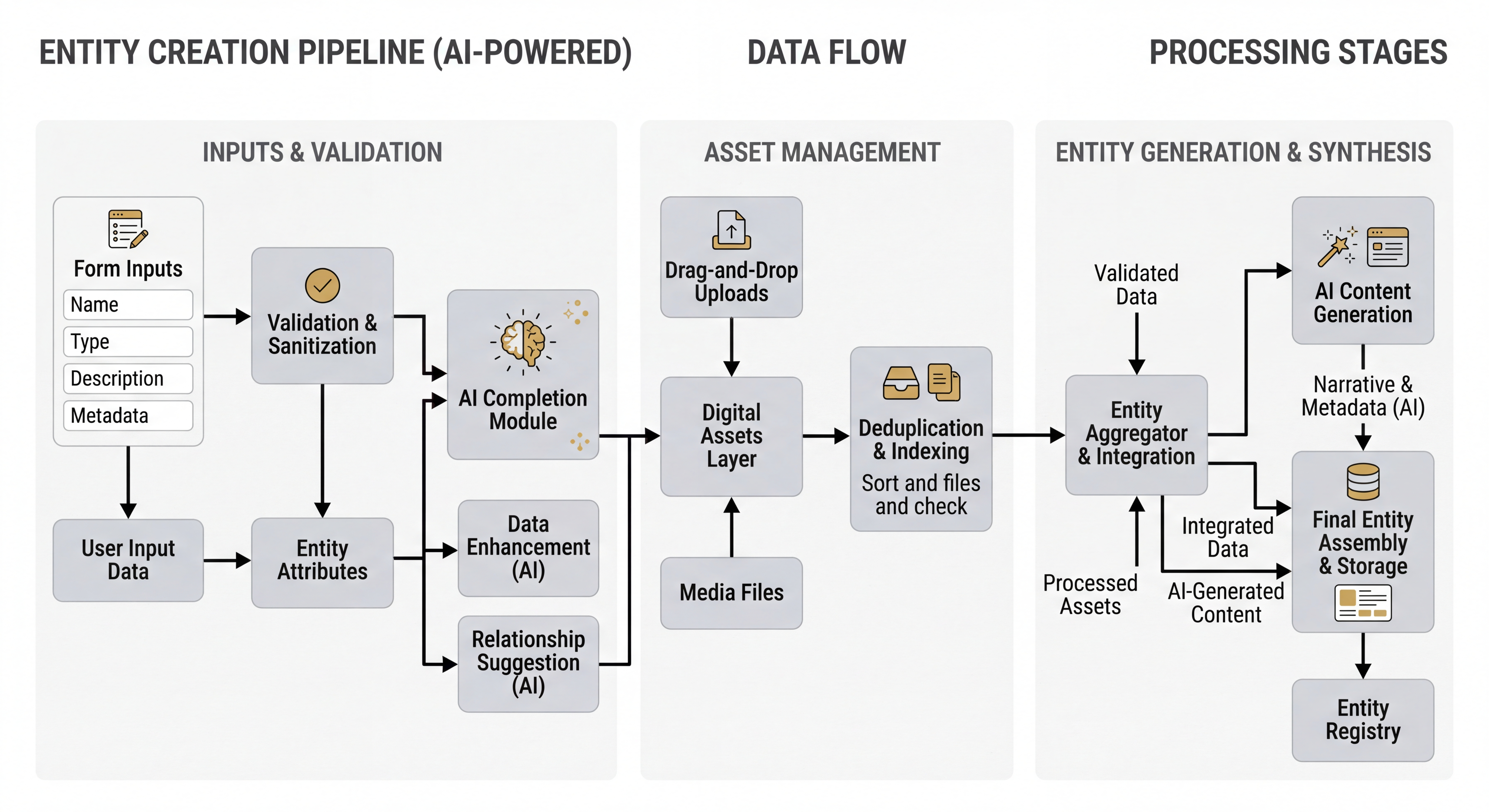 Entity forms validate via Zod, deduplicate at the asset layer, and merge with AI-generated entities during storyboard generation.
Direct Benefit: You can now build your world — characters, locations, style references — before hitting “Generate,” and the pipeline will honor every asset you’ve created, weaving them into the storyboard with full continuity.
3. Canvas Performance & Interaction Hardening
The canvas received its deepest UX pass yet: performance optimization for large projects, floating panel architecture, permanent entity deletion, and a systematic fix for seven interrelated event propagation bugs.
- 1000-Node Performance:
React.memo,useCallback, anduseShallowselectors have been applied across all canvas components with explicitPERF-MEMO,PERF-CALLBACK, andPERF-SELECTORmarkers. The node graph now handles thousands of image/video-bearing nodes without frame drops. - Floating Panels: The
MessagesSidebarhas been converted to an absolutely-positioned floating panel with backdrop blur. TheRightSidebaris now resizable via a visible grip handle, and minimap positioning dynamically offsets based on which panels are open. - Permanent Deletion: Entity nodes can now be permanently deleted from both the node store and the project store. The
DeleteNodeConfirmationDialogremains open during async operations, preventing the UI from closing before the database round-trip completes. - Context Menu Hardening: A chain of seven fixes resolved event propagation conflicts between the context menu, modals, and Radix UI dropdowns. Solutions include a new
EventStopperwrapper component, capture-phase click-outside detection, auseUIMenuStorefor mutual menu exclusivity, and ref-patternonClosehandlers to prevent stale closures. - Global Notifications: The bespoke
useToasthook has been replaced with a unifiedGlobalNotificationssystem backed byusePipelineStore, consolidating all user-facing messages into a single event stream.
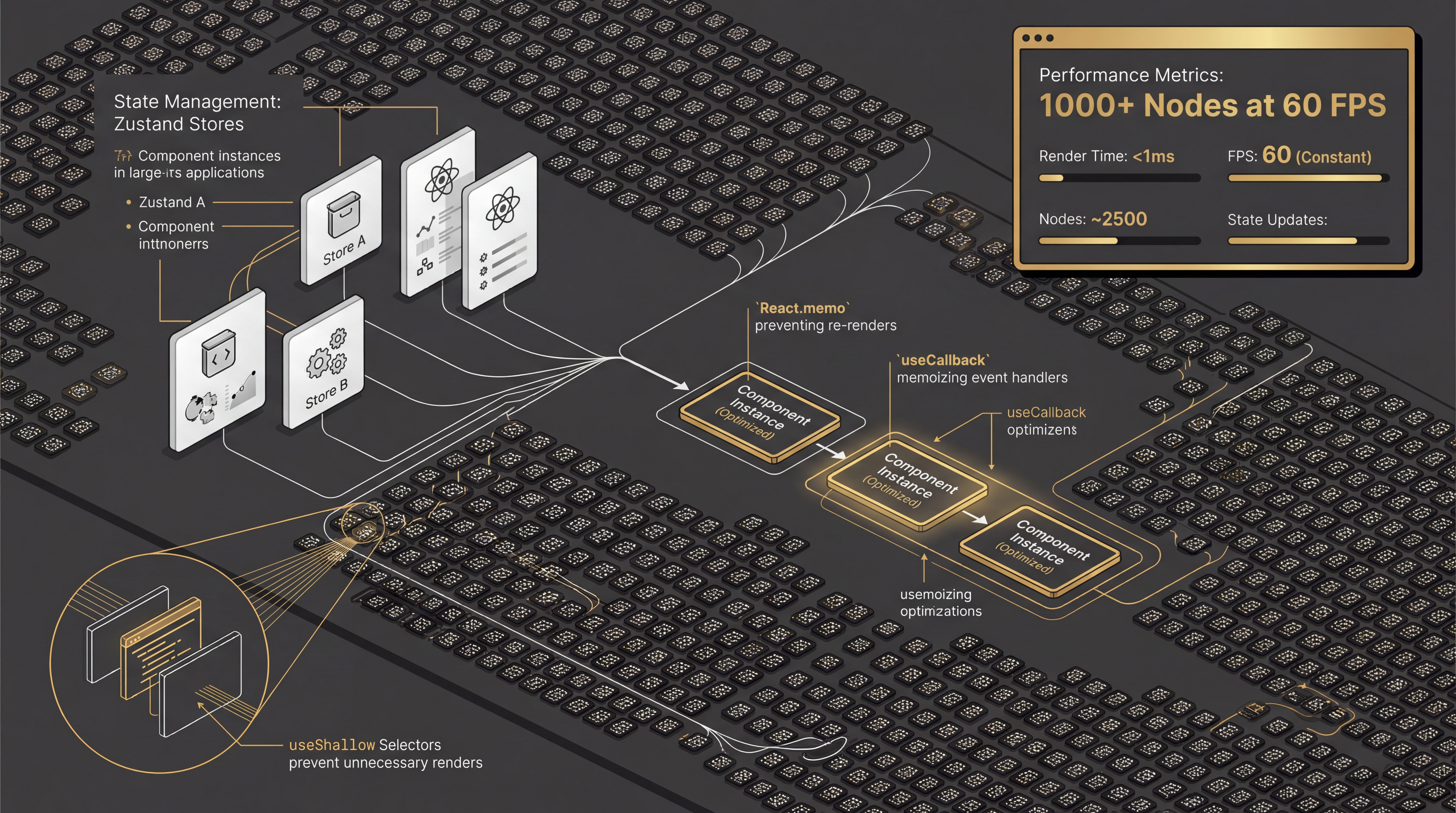 Floating panels, memoized node rendering, and unified state management deliver smooth performance at narrative scale.
Direct Benefit: The canvas now handles ambitious projects — hundreds of entities with media — with smooth, 60fps interactions, reliable context menus, and destructive actions that work exactly as expected.
This week marks a shift in what Cinematic Canvas is. The workspace is no longer just a layout surface — it’s an authoring environment. Creators can write scenes, build characters with validated forms, drop reference images onto the canvas, and trust the pipeline to weave it all together. The underlying canvas infrastructure has been hardened to handle the scale that real storytelling demands.
Shipping Next
- Scene-as-Code Branching: Enabling version-controlled branching for world lore so creators can explore narrative forks without risk.
- Composite Generation UI: Surfacing the
GENERATE_COMPOSITEpipeline step as an interactive node merging tool on the canvas. - Timeline View: Translating the spatial canvas layout into a sequential video timeline for final review and export.
The tools of creation should be as ambitious as the stories they tell. Every optimization, every validated form, every pixel of the Scene Editor exists to keep the creator’s focus where it belongs: on the narrative.
🔗 Read the full changelog: github.com/digitalcreationsco/cinematic-canvas/blob/main/CHANGELOG.md
Thank you for building with us. The writer’s room is open.
#GenerativeAI #GenerativeVideo #SceneEditor #WorldBuilding #ReactFlow #CreativeTools #StructuredStorytelling #CanvasPerformance